
Hostinger vs Bluehost: Honest Differences Beginners Feel
⏱️ Estimated Reading Time: 9 minutes
Hostinger vs Bluehost compared for real beginners—pricing, setup speed, dashboards, and renewal costs. See which fits your late-night workflow.
You know that 11 PM feeling when the kids are finally asleep, your brain is half offline, and you still want to make progress on your blog before you crash? You’ve got maybe twenty minutes before your brain shuts off completely. You open your laptop, ready to start the blog you’ve been thinking about for weeks. Then you hit the first wall: which hosting company do you actually pick?
That’s where the Hostinger vs Bluehost decision usually stalls people out. Both are popular, both claim to be beginner-friendly, and both have WordPress hosting plans that look nearly identical on the surface. This guide breaks down what actually matters when you’re tired, short on time, and just want a site that works.
Most people don’t need a “perfect” hosting setup. They need one that gets out of the way so you can go from zero to a live site with minimal frustration. That’s exactly what we’re breaking down: Hostinger vs Bluehost in the most practical way possible, comparing dashboard experience, pricing transparency, and the actual late-night setup process that matters when your energy is low.
The Real Problem With Choosing Hosting When You're Exhausted
When beginners say a host is “easy,” they usually mean three specific things: the dashboard makes sense immediately, WordPress installs without issues, and you don’t feel lost when you come back the next day.
That’s critical because most blogging happens in stolen windows — after work, after dinner, or after bedtime. You have 20–30 minutes, and you want visible progress before you crash.
The wrong hosting choice adds friction at every step. The right one? It disappears and lets you build.
Hostinger vs Bluehost: What Beginners Notice First
When you’re new, “easy” usually means three things: a dashboard that makes sense, a WordPress install that doesn’t break, and a setup you can return to without feeling lost. That’s the real test.
Hostinger (affiliate link) uses a custom panel called hPanel, built with clear labels like Files, Emails, Domains, and WordPress. There’s no clutter competing for your attention.
Bluehost (affiliate link) takes a different approach. It layers a beginner-friendly dashboard over traditional cPanel, which can feel familiar if you’ve used hosting before — but it also comes with more menus and a Marketplace section pushing themes and plugins.
Here’s the practical difference:
Feature | Hostinger | Bluehost |
Dashboard | hPanel (custom, modern) | cPanel-based with custom layer |
Menu complexity | Minimal, task-focused | More menus, includes Marketplace |
Feels familiar to | First-time users | Anyone who’s used hosting before |
Learning curve | Lower | Slightly higher |
Neither is “wrong.” One feels like a clean app. The other feels like a toolbox you’ve seen before.
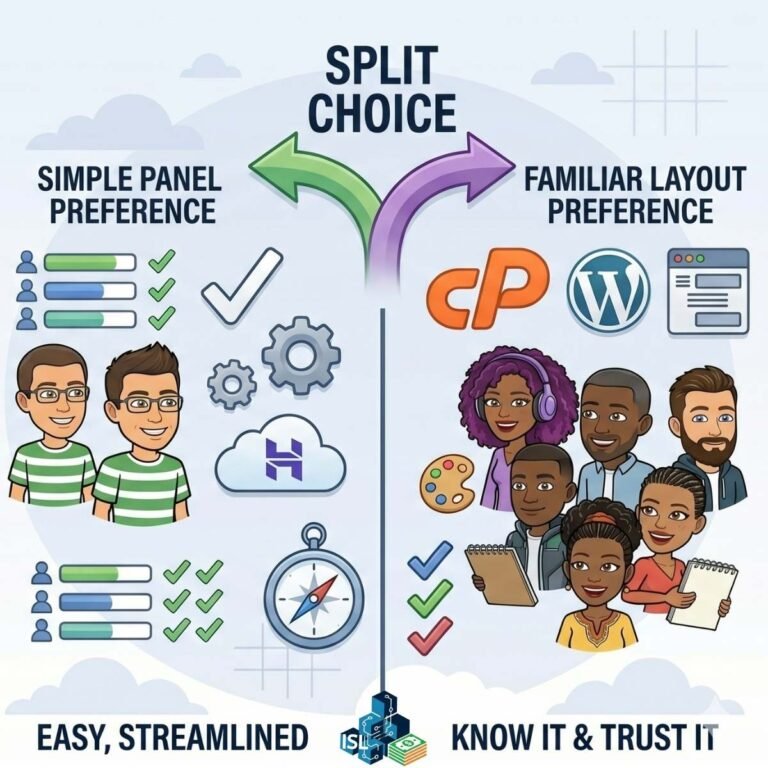
In simple terms: Hostinger often feels more streamlined, while Bluehost feels more traditional. Both are beginner-friendly, but the experience depends on your preference for simplicity versus familiarity.
Pricing vs Comfort: Where Beginner Hosting Gets Tricky
Pricing pages are where most people either save money or accidentally overspend. The headline price is rarely the full story.
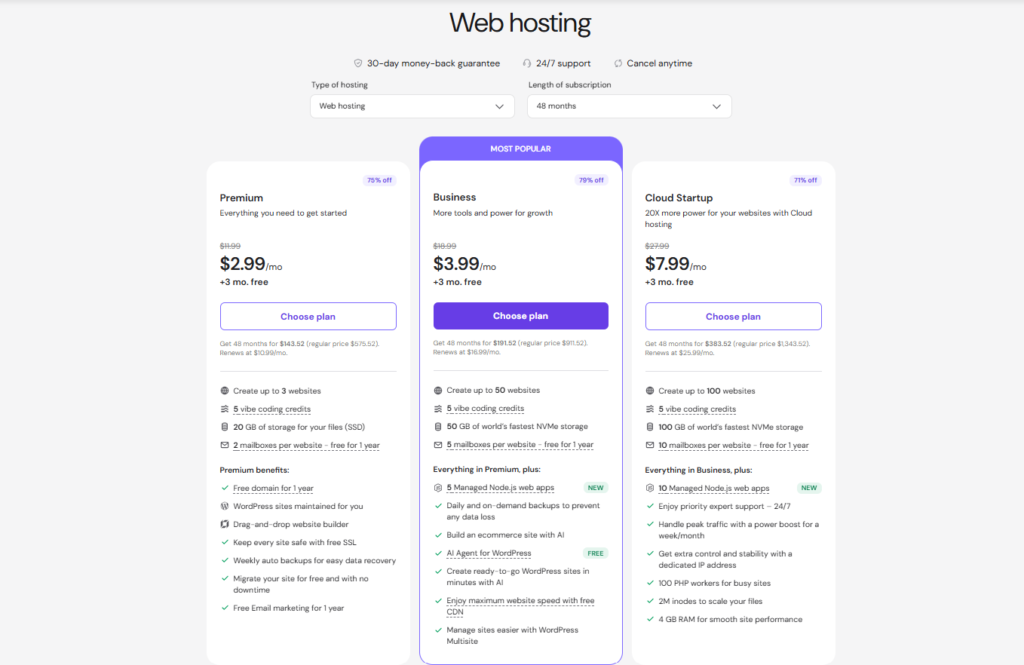
Hostinger pricing tends to be transparent. Their Premium plan — suitable for most beginner bloggers and multi-site setups — runs around $2.69–$2.99/month on a 48-month term, renewing around $10.99–$12.99/month. Add-ons generally aren’t pre-selected, so what you see is closer to what you pay.
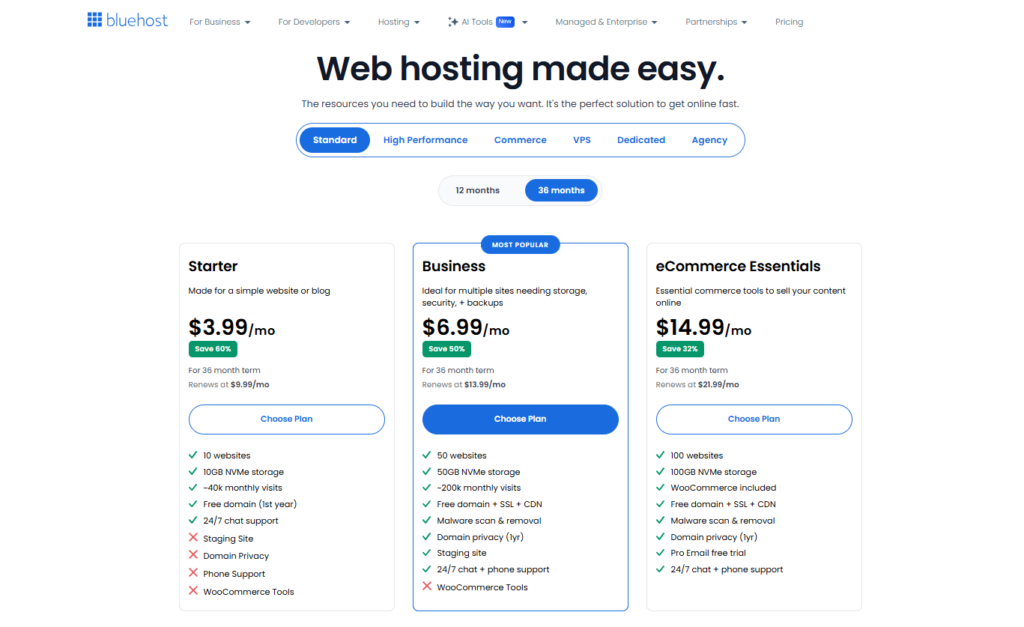
Bluehost offers similarly competitive intro pricing. Their Starter plan runs around $1.99–$3.99/month on a 36-month term (sometimes lower during promotions), renewing around $9.99–$11.99/month. The catch: optional extras like CodeGuard or SiteLock may be pre-selected at checkout, so review your cart carefully.
Factor | Hostinger | Bluehost |
Intro price (36–48 mo) | $2.69–$2.99/month | $1.99–$3.99/month |
Renewal price | $10.99–$12.99/month | $9.99–$11.99/month |
Add-ons pre-selected | Usually not | Often yes (CodeGuard, SiteLock) |
Checkout transparency | More straightforward | Requires closer review |
“Most beginners get tripped up not by the sticker price, but by what’s quietly added to the cart at checkout.”
Both providers raise prices at renewal — that’s standard across the hosting industry. The real question isn’t “what’s the launch price,” but “what does year two actually cost me, and am I paying for anything I didn’t ask for?”
The key difference: Hostinger tends to feel more straightforward, while Bluehost may require a closer look before completing your purchase. Also, both providers increase pricing at renewal, so it’s important to consider long-term costs, not just the introductory rate.
Don’t let the launch-day price fool you. Renewal pricing matters more once you’re past the first term.
How Much Should You Really Budget for Hosting?
Don’t anchor on the first-year price alone. Factor in the renewal rate (often double or more) and check your cart for pre-selected extras before you click purchase. That’s the number that actually matters long-term.
Mini Case Study
A reader switching from a free blogging platform to Bluehost’s Starter plan paid $2.95/month for the first term, but didn’t notice CodeGuard Basic had been added at checkout — bumping the total by a few dollars monthly. Nothing dramatic, but it’s the kind of thing that adds up across multiple tools, and it’s worth a 30-second scan before confirming any order.
The Late-Night Test: Setup When You're Running on Fumes
This is the scenario that actually matters: it’s late, you have 20–30 minutes, and you want to see a live site by the time you close the laptop.
With Hostinger, checkout leads into a setup wizard that asks about your site and experience level. WordPress installs in the background, SSL turns on automatically, and your dashboard is ready within minutes. Minimal decisions, minimal friction.
With Bluehost, you also get guided onboarding and one-click WordPress install, plus included SSL. The interface feels more layered, though, and you may encounter extra default plugins or additional steps to review before you’re done.
Which One Actually Wins When You're Low on Energy?
Both work well technically and both get you to a live site. But Hostinger generally requires fewer steps and less navigation, which can make a difference when you’re exhausted.
Some independent tests suggest Hostinger performs well on shared hosting, though actual performance will vary depending on setup and usage.
How Long Does It Actually Take to Get a Blog Live?
With either host, expect 20–30 minutes from checkout to a working WordPress site if you’re using the guided setup wizard. Hostinger’s process tends to involve fewer extra screens, while Bluehost’s has a couple more steps to click through.
Hostinger vs Bluehost: Which One Should You Actually Choose?
There’s no universal winner here — it depends on what you’re optimizing for.
Choose Hostinger If…
- You want a lower entry cost with transparent pricing
- You prefer a cleaner dashboard without promotional clutter
- You want a setup process that minimizes friction when you’re tired
- You’re blogging in small time windows and need fast progress

Choose Bluehost If…
- You prefer a more traditional experience with familiar cPanel
- You value the WordPress.org recommendation and ecosystem
- You want access to phone support in addition to chat
- You’ve used Bluehost before and like the workflow

The Practical Verdict for Time-Constrained Beginners
For many beginners with limited time, Hostinger often feels easier to stick with because of its streamlined interface and straightforward setup.
But Bluehost remains a solid and reliable option depending on your preferences, especially if phone support matters to you.
Common Mistakes When Comparing Hostinger vs Bluehost
Mistake 1: Choosing Based Only on Launch-Day Experience
One common mistake is choosing based only on the launch-day experience instead of what using the platform feels like after a few months, especially when renewal pricing and usability matter more.
You might love the first 30 days, then hate the $12/month renewal and cluttered dashboard later.
Mistake 2: Assuming "Beginner-Friendly" Is the Same for Everyone
Another is assuming “beginner-friendly” is the same for everyone. Some people prefer a simpler interface, while others prefer something more familiar with traditional cPanel.
Your definition of “easy” might be different from your friend’s. Test both if you can.
Mistake 3: Overbuying Hosting You Don't Need
Also, avoid overbuying. Most beginner blogs just need:
- A stable platform
- A clear dashboard
- Room to grow (multiple sites if needed)
You don’t need enterprise features until you actually have enterprise traffic. Start simple, upgrade later.
FREE 5-Day Challenge:
Build Momentum Without the Tech Overwhelm
If you want a structured way to move forward, I’ve put together a free 5-Day Challenge: Build a Sellable Digital Product in 5 days. It focuses on simple, actionable steps without overwhelming tech.
This challenge helps you move past the “I need to figure out hosting first” barrier and actually create something valuable.
Final Verdict: Hostinger vs Bluehost for Exhausted Beginners
Here’s the honest takeaway: if your goal is to get online quickly with minimal friction, especially during limited time windows like 11 PM after bedtime, Hostinger often has a slight edge in ease of use.
The cleaner dashboard, transparent pricing, and faster setup wizard make it the less annoying choice when you’re tired.
Bluehost is still a strong choice, particularly if you value guided support (including phone calls) and familiarity with traditional hosting interfaces.
The best hosting platform is the one you’ll actually log into, use consistently, and build on over time. Not the cheapest one, not the most recommended one — the one you’ll stick with.
Frequently Asked Questions
What's the actual difference between Hostinger vs Bluehost for beginners?
Hostinger offers a cleaner hPanel dashboard with transparent pricing and faster setup, while Bluehost uses traditional cPanel with a beginner layer and may include pre-selected add-ons during checkout.
How much does Hostinger vs Bluehost cost per month?
Hostinger’s Premium plan runs roughly $2.69–$2.99/month on a 48-month term, while Bluehost’s Starter plan runs around $1.99–$3.99/month on a 36-month term. Both renew at higher rates, typically $9.99–$12.99/month.
Does Bluehost add extra fees at checkout?
Bluehost may pre-select optional extras like CodeGuard or SiteLock during checkout. Always review your cart before completing the purchase to avoid unexpected charges.
Which host installs WordPress faster?
Both Hostinger and Bluehost offer guided setup wizards with one-click WordPress installation. Hostinger’s process tends to involve fewer additional steps and screens.
Can I host multiple sites on Hostinger Premium vs Bluehost Starter?
Hostinger Premium supports multiple sites. Bluehost Starter is typically for one site, so check current plans if you need room for multiple blogs or digital products.
Do Hostinger and Bluehost both include SSL certificates?
Yes, both providers include SSL certificates automatically during the WordPress setup process, so your site is secured from day one.
Which hosting company has better customer support?
Bluehost offers phone support in addition to live chat, while Hostinger primarily relies on chat-based support. Your preference may depend on how you like to troubleshoot issues.
Which is Worth It?
Both Hostinger and Bluehost will get a beginner blog online, and neither choice is going to make or break your results. The differences come down to dashboard comfort, checkout transparency, and how many extra steps you’re willing to tolerate when you’re short on time. Hostinger tends to edge out for pure simplicity and lower friction, while Bluehost makes sense if familiarity and phone support matter to you. Either way, the real work — consistency, content, and follow-through — happens after the setup screen, not during it. Pick one, get it live, and put your energy into building rather than agonizing over the choice.
⚠️ Affiliate Disclosure: This post contains affiliate links to tools we have tested or would genuinely use ourselves. If you sign up through our links, we may earn a small commission at no extra cost to you.
Start Your Income Stack Today
📝 Download the free Income Stack Starter Checklist — the PDF helps you choose one realistic income stack and take your first step this week. No overwhelm. No guessing. Just a clear action plan.
Stop searching, start building. Get ready to take the FREE 5-Day Digital Product Challenge. This challenge helps you move past the “I need to figure out hosting first” barrier and actually create something valuable.
🎯 Want the best insights delivered straight to your inbox, subscribe to our weekly newsletter — no spam, just weekly actionable strategies to help you grow your income stack.
Want more? Here is where to find us:
If this resonated with you, come join the community across all our platforms. Subscribe to our YouTube channel ‘The Income Stack Lab’ for weekly videos on AI tools, automation workflows, and income experiments. Follow us on X, Instagram, TikTok, LinkedIn and Facebook for bite-sized tips, behind-the-scenes updates, and daily inspiration to keep building.
Enjoying the content? Buy me a coffee— fuel the lab, keep the ideas flowing.
Your future self will thank you for starting today. Happy Stacking!