
AI Reminder System for Parents: 5 Smart Fixes for Chaos
⏱️ Estimated Reading Time: 9 minutes
Feeling behind on bills and school deadlines? See how an AI reminder system for parents catches what you miss. Read the guide now!
Saturday morning, coffee cooling, and you’re scrolling forty unread emails wondering if the daycare invoice got paid or if today was the field trip deadline. That dread is why parents start searching for an AI reminder system for parents. Not because they lack discipline, but because their inbox has quietly become a graveyard of due dates, buried in newsletters nobody has time to read twice.
This isn’t a story about getting organized through sheer willpower. It’s about handing the remembering to something else. An AI reminder system for parents won’t replace your judgment, but it catches what your tired brain drops — and that difference changes more than your inbox.
Heads up: This post contains affiliate links. If you buy through them, we may earn a small commission at no extra cost to you — it helps keep ISL going. We only recommend tools we’d genuinely use ourselves.
The Breaking Point Most Parents Recognize
Most people don’t fix their household admin until something small breaks in a way that actually hurts. A missed utility notice or a school fee buried three paragraphs deep is usually the trigger, not a grand plan to get organized.
That kind of moment is common enough that it’s worth naming directly. A missed newsletter deadline can cost a kid a class trip, not because a parent didn’t care, but because the information never surfaced in time. That gap between caring and catching things is exactly what a coordination system is supposed to close.
It rarely feels like a slow drift. One buzzing phone at the worst possible moment tends to be the thing that finally forces a change. For one parent, it was a final utility notice on the way out the door — not a money problem, a bandwidth problem. The bill wasn’t unaffordable; it was invisible until it was already late.
The same week brought a second miss: a class trip fee mentioned once, in a newsletter nobody had time to reread. Missed deadlines like that rarely feel dramatic in the moment. They just quietly cost something — a fee, a trip, an afternoon of guilt that didn’t need to happen.

Is Another App Really the Answer?
Direct answer: no — the fix isn’t one more calendar or reminder app to manage manually. It’s shifting from “I have to remember everything” to a light layer that reads, sorts, and flags things before they become urgent, using tools already built for that job.
The instinct after a bad week is usually to download something new. That instinct is worth resisting. Most households already have three half-used apps; adding a fourth rarely solves a bandwidth problem — it just adds another thing to check.
The more durable shift is picking one annoying task and letting a tool take a first pass at it, rather than trying to overhaul everything in a single weekend. That’s the version of an AI reminder system for parents that actually sticks.
Start this week. Take one action.
Download the free Income Stack Starter Checklist — the PDF helps you choose one realistic income stack and take your first step this week. No overwhelm. No guessing. Just a clear action plan.
Turning a Six-Page Newsletter Into a Checklist
A school newsletter is a good first test case, since it’s dense, inconsistent in format, and easy to skim past the one line that matters. Pasting the text into a free AI chatbot and asking for a ranked checklist turns five minutes of dread into a five-second scan.
A prompt like “pull out every important date, payment deadline, and form I need to sign, and rank by urgency” does most of the sorting work instantly. ChatGPT is one option many parents already have open in another tab, which lowers the barrier to actually trying this.
Going a step further, asking the same tool to output the dates as a calendar file removes the last manual step. One import, and the deadlines sit in a phone calendar with reminders already attached — no retyping, no relying on memory to check the newsletter again.
Manual Newsletter Triage vs. AI-Assisted Triage
Task | Manual Approach | AI-Assisted Approach |
Reading a 6-page newsletter | 10–15 minutes, skimming | Paste text, get a ranked list in seconds |
Catching buried deadlines | Easy to miss on a tired read | Explicit prompt surfaces every date |
Getting dates into a calendar | Manual retyping, error-prone | One-click calendar file import |
Repeat next month | Same time cost again | Same prompt, reused in seconds |
That table isn’t about one tool being magic — it’s about removing repeated manual steps that don’t need a human doing them every single time.
Reducing the Guesswork on Bills
Recurring bills and one-off school fees behave differently, and treating them the same is where most systems break down. Fixed costs like tuition or daycare fit auto-pay well. Variable costs need something that can flag an amount before it’s due.
For fixed recurring costs, auto-pay removes memory from the equation entirely — there’s nothing to forget if the payment is already scheduled. For bills that change month to month, tracking apps like TimelyBills or PocketGuard let you log or sync a bill so the due date gets flagged instead of guessed at.
Results with any bill-tracking app depend on how consistently it’s used and how well it connects to your specific bank setup, so it’s worth testing before fully relying on one. One-off costs — activity fees, permission slip payments, irregular charges — are where auto-pay can’t help, since there’s no fixed schedule to lean on.
Scan-based tools like SnapReminder fill that gap by reading a photographed bill and setting a reminder from it. It’s a useful backup layer, not a guaranteed catch-all, so a quick skim of the original document is still worth doing.
“None of these tools replaced my judgment — they reduced how much I had to remember on my own.”

When Individual Tools Start Working Together
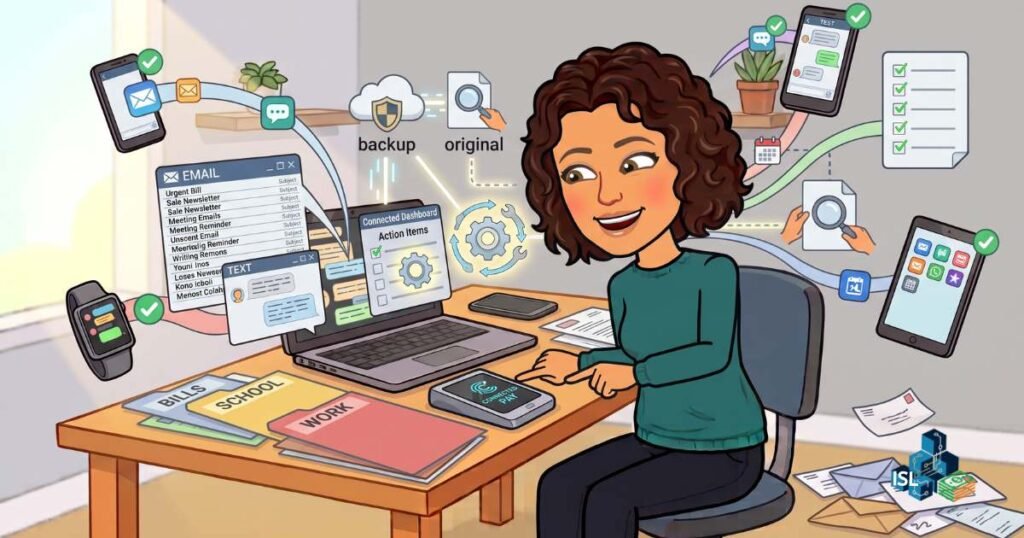
The real bottleneck usually isn’t any single bill or newsletter — it’s volume. Everything arrives at once, scattered across email, text, and apps that don’t talk to each other, which is where individual tools stop being enough on their own.
This is the point where connected assistant tools start to matter more than single-purpose apps. Tools like Ollie AI connect to email and calendar to flag an outstanding bill or fee before an inbox even gets opened. For call-heavy admin — enrollments, insurance claims, appointment scheduling — KallyAI is built to help manage or place some of those calls.

Is This Combination Actually Reliable?
Direct answer: it’s genuinely useful but not flawless. These tools reduce how often something slips through the cracks, but they don’t reduce how carefully a parent should still check the important stuff — particularly anything involving payments, contracts, or sensitive personal information.
Mini case study: One parent testing this combination found a school fee deadline had already been flagged and added to their calendar before they’d even opened their inbox that week — a small moment, but one that would have otherwise meant a last-minute scramble. It didn’t work perfectly every week, but it worked often enough to change the baseline level of stress.
Building a Family Daily Brief
The cumulative effect of these small changes tends to show up as one short summary each morning rather than a full inbox scroll — something closer to a Family Daily Brief than a chaotic to-do list scattered across five apps.
A working version might read: tuition auto-paid, no action needed. Field trip fee due in three days, flagged high priority. Soccer form scanned, reminder set. Insurance renewal confirmed. A few lines, and most of a day’s admin load is visible before anyone’s left the kitchen.
That’s not the same as a flawless system. Important items still deserve a second look, and no combination of tools should fully replace checking the things that matter most — payments, legal deadlines, anything involving a signature. Moreover, automated payment tools still require periodic manual review to catch errors early.
How to Start Without Overhauling Everything at Once
The temptation is to try to set up all of this in one weekend. That temptation is worth resisting, since a system built in a single afternoon rarely survives contact with an actual busy week — a slower, staged rollout tends to hold up far better over time.
- Pick one recurring bill and set up auto-pay for it.
- Paste one dense document — a newsletter, a form — into an AI chatbot and ask for a ranked checklist.
- Try one scan-based reminder app on a single one-off fee.
- Only after those three feel routine, consider a connected assistant tool for email and calendar.
Minimum Viable Progress here looks like one bill and one newsletter handled differently this week — not a full household overhaul. That small shift is usually what actually sticks past the first month.
FREE 5-Day Challenge
Build Momentum Without the Tech Overwhelm
If you want a structured way to move forward, I’ve put together a free 5-Day Challenge: Build a Sellable Digital Product in 5 days. It focuses on simple, actionable steps without overwhelming tech.
This challenge helps you move past the “I need to figure out hosting first” barrier and actually create something valuable.
Frequently Asked Questions
What is an AI reminder system for parents?
An AI reminder system for parents combines chatbot-based document triage, auto-pay for fixed bills, and scan-based tracking for one-off fees into a single loosely connected routine. It’s meant to reduce how much a parent has to remember manually, not replace their judgment entirely.
Do I need to pay for these tools to get started?
No — many chatbot tools have free tiers that handle newsletter triage and checklist generation without a subscription. Paid tiers or dedicated bill-tracking apps become more useful once the manual version feels worth automating further.
Is it safe to connect AI tools to my email or bank accounts?
It depends on the specific tool and how carefully you review its permissions and data practices before connecting anything sensitive. It’s worth reading a tool’s privacy policy and starting with lower-stakes tasks before connecting financial accounts.
How long does it take to set up a Family Daily Brief?
The initial setup — auto-pay on one bill and one chatbot-based checklist — typically takes under an hour to try once. Building a fuller routine tends to happen gradually over several weeks rather than in one sitting.
Can this replace checking my bills and deadlines myself?
No — these tools are designed to reduce how much slips through, not to remove the need for occasional manual review. Payments, legal deadlines, and anything requiring a signature still deserve a direct look.
What's the difference between auto-pay and scan-based reminder apps?
Auto-pay works best for fixed, predictable costs like tuition, since there’s nothing variable to track. Scan-based apps like SnapReminder are built for irregular, one-off costs where the amount and due date change each time.
Is This Worth It?
An AI reminder system for parents isn’t a dramatic fix, and it won’t turn a chaotic week into a calm one overnight. What it does is quietly catch some of what used to slip through — a fee, a form, a due date — before it turns into a late notice.
The time investment is real but front-loaded: an hour or two testing a few tools, then a lighter ongoing routine of glancing at a daily summary. It’s not flawless, and important items still deserve a manual double-check. For a household running on borrowed time already, that trade tends to be worth making.
⚠️ Affiliate Disclosure: This post contains affiliate links to tools we have tested or would genuinely use ourselves. If you sign up through our links, we may earn a small commission at no extra cost to you.
Start Your Income Stack Today
📝 Download the free Income Stack Starter Checklist — the PDF helps you choose one realistic income stack and take your first step this week. No overwhelm. No guessing. Just a clear action plan.
Stop searching, start building. Get ready to take the FREE 5-Day Digital Product Challenge. This challenge helps you move past the “I need to figure out hosting first” barrier and actually create something valuable.
🎯 Want the best insights delivered straight to your inbox, subscribe to our weekly newsletter — no spam, just weekly actionable strategies to help you grow your income stack.
Want more? Here is where to find us:
If this resonated with you, come join the community across all our platforms. Subscribe to our YouTube channel ‘The Income Stack Lab’ for weekly videos on AI tools, automation workflows, and income experiments. Follow us on X, Instagram, TikTok, LinkedIn and Facebook for bite-sized tips, behind-the-scenes updates, and daily inspiration to keep building.
Enjoying the content? Buy me a coffee— fuel the lab, keep the ideas flowing.
Your future self will thank you for starting today. Happy Stacking!