
Claude Skill File Limits: 4 Rules That Decide What Gets Read
⏱️ Estimated Reading Time: 11 minutes
Claude skill file limits decide how much of your SKILL.md is actually read. Get the four numbers and the seven-check audit. Start checking now.
TL;DR
Claude loads a skill in three passes, and each pass has a gate. Four numbers control those gates: a reference file over 100 lines needs a contents list at the top, the SKILL.md body stays under 500 lines, the skill name caps at 64 characters, and the description caps at 1,024 characters. Break any of them and nothing errors. The skill simply loads less than was written.
One public skill library has 131 reference files that Claude will probably never finish reading. Nothing in it is broken. Nothing throws an error. Claude opens a file, reads roughly the first hundred lines, decides that is enough, and carries on with half the picture.
That is the part the guides skip. The claude skill file limits are far more specific than the advice going around, and almost none of them are about the writing. They are about the shape — how many lines go in a file, how deep files stack, how many characters go in the header. A skill that breaks the shape fails quietly, which is worse than failing loudly, because there is no error to look up. So if a skill built a few months ago feels vaguer than it used to, nothing has gone wrong with Claude. The file is being read in part.
The four numbers, in one table
| Limit | What it caps | Where it lives | What happens when it is broken |
|---|---|---|---|
| 100 lines | The length at which a reference file needs a contents list at the top | Any file in the skill folder that is not SKILL.md | Claude previews roughly the first 100 lines and never learns the rest of the file exists |
| 500 lines | The upper bound on the SKILL.md body | SKILL.md, everything below the frontmatter | Every token competes with conversation history once the body loads |
| 64 characters | The maximum skill name — lowercase letters, numbers and hyphens only | The name field in the YAML frontmatter | Invalid name, including any name containing "claude" or "anthropic" |
| 1,024 characters | The maximum skill description, written in third person | The description field in the YAML frontmatter | Discovery fails — the description is the only thing Claude matches a request against |
| One hop | How far a reference file sits from SKILL.md | Every link out of SKILL.md | A file two hops out gets previewed, not read |
Every limit on this page was checked against Claude's own documentation in October 2026.
This is for anyone who has written a skill or is about to write one. Anyone who only uses the built-in ones can skip it. And it is not an enterprise feature — skills run on the free plan as well as the paid ones. Claude's own pricing page lists Pro at $20 a month as of October 2026, and Free at $0.
How does Claude actually load a skill file?
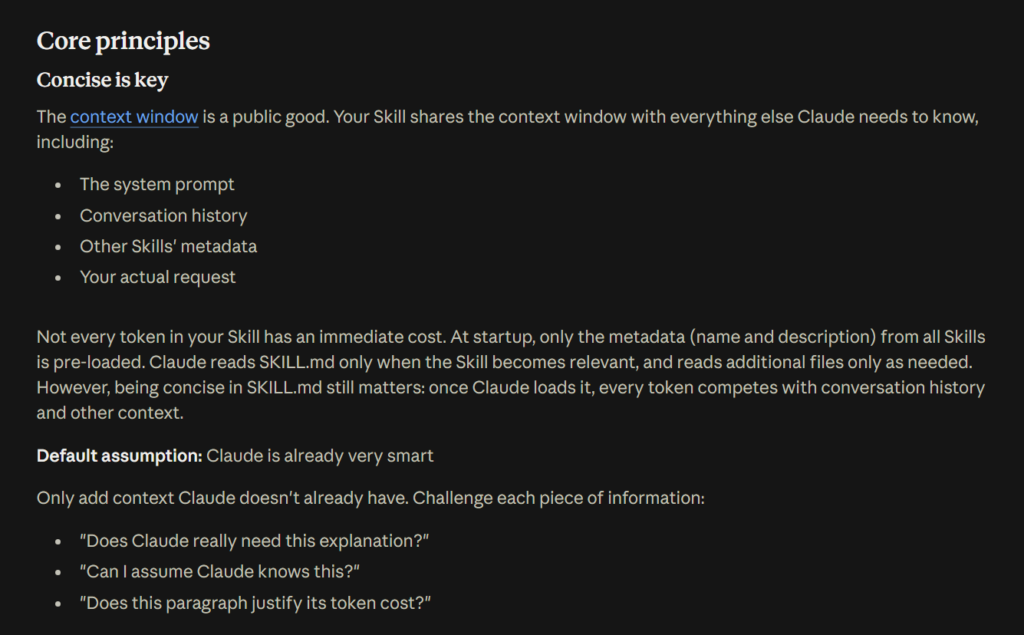
Claude loads a skill in three passes, not one. At startup it reads only the name and description of every installed skill. When a request matches one of those descriptions, it reads the SKILL.md body. Everything else — reference files, scripts, templates — enters only when the body sends Claude to fetch it.
The documentation puts hard figures on each pass. Pass one costs roughly 100 tokens per skill and happens every session whether the skill is used or not, which is why forty installed skills cost almost nothing to keep. Pass two loads the SKILL.md body at under 5k tokens, and only on a match. Pass three costs nothing until a file is actually read, and scripts are cheaper still: when Claude runs a script through bash, only the output enters the context window, never the script's code.
Three passes, three gates. The description decides whether the skill is found. The body decides what Claude does. The reference files decide how well it does it. Almost every guide online stops at the first gate, because writing a description feels like writing. The other two feel like filing — and filing is where the specifics live.
Why does Claude only read part of a long reference file?
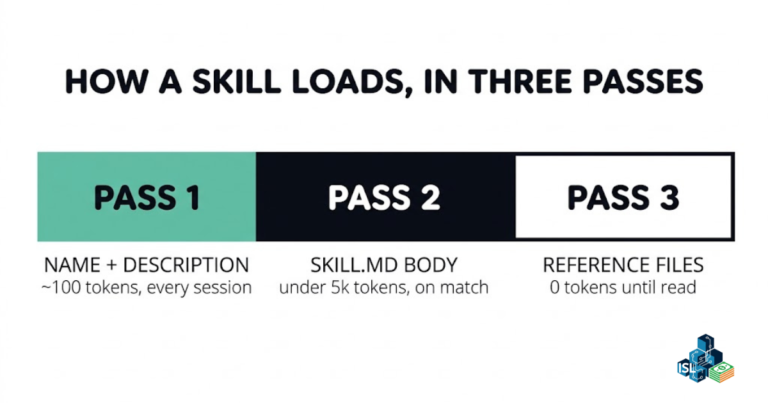
Because following a reference is not the same as reading it. When Claude is sent to a file, it may preview the top of that file rather than load the whole thing — the documentation describes partial reads using commands like head -100. It takes the opening lines and judges the file from them.
That is the entire failure mode, and it explains why there is never an error. The skill loads. The reference loads. The half of the file that mattered simply never enters the conversation, because nothing in the first hundred lines hinted that it existed. If the section needed starts at line 200 and the top of the file gives no sign of it, Claude does not go looking. It answers from what it saw and sounds just as confident doing it.
This is the same failure shape that makes vague instructions expensive elsewhere — the model fills the gap rather than flagging it. The same thing happens with the prompting habits that quietly cost accuracy, and it is why multi-agent setups break in ways nobody notices for weeks.

🎬 Watch the full video breakdown below
Claude skill file limits start at 100 lines
Any reference file longer than 100 lines needs a contents list at the very top. That is the first of the claude skill file limits, it costs about a minute per file, and it is the highest-value edit available to most skill folders today.
The reason follows directly from the preview problem. A contents list turns the previewed top of the file into an index of the whole file. Claude sees the full scope even on a partial read, and knows there is a reason to keep going. Four or five lines above everything else does it:
# API Reference

## Contents
- Authentication and setup
- Core methods (create, read, update, delete)
- Advanced features (batch operations, webhooks)
- Error handling patterns
- Code examples
That is the whole fix. The skill authoring best practices page gives the pattern in those words. Open any skill folder, look at every file that is not SKILL.md, count the lines, and add a contents list to each one over 100. Nothing else in this post is that cheap.
How long can a SKILL.md body be, and how deep can references go?
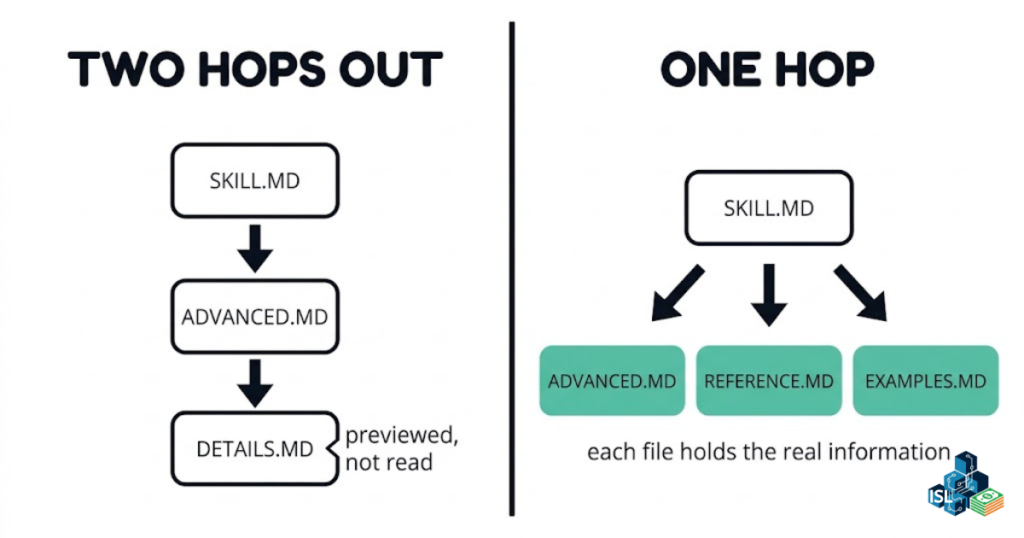
The SKILL.md body stays under 500 lines, and every reference file links directly from SKILL.md — one hop, no chains. Past 500 lines the guidance says to split the file. Past one hop, the file at the end of the chain gets previewed rather than read.
Long skills break the 500-line rule most often, and for an honest reason: the author kept adding things that were genuinely useful. Useful and loaded are different states. The body competes with conversation history for context the moment it loads, so every line in it is spending something.
The nesting rule is blunter. The documentation names the chain that fails — SKILL.md points at advanced.md, advanced.md points at details.md, and the thing actually needed sits in details.md, two hops out, being previewed. The fix is to flatten it so each file holds its own information and hangs straight off SKILL.md. The Claude Academy lesson on multi-file skills walks the same structure.
The fair objection
If Claude previews long files, why not make every file short? Because then there are thirty files, and the one-hop rule means all thirty hang directly off SKILL.md. At some point the index becomes the problem. The target is a handful of substantial files, each with a contents list, each one hop out.
What one audit of a public skill library found
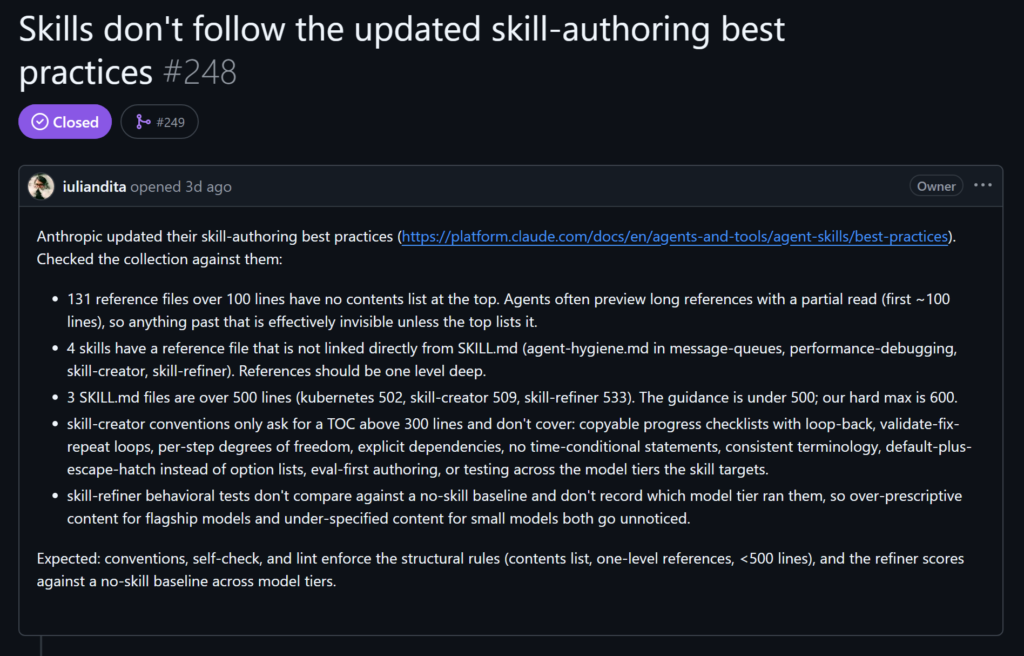
On 2 October 2026, a maintainer checked a public skill library against exactly these rules and published the counts. 131 reference files over 100 lines with no contents list. 4 reference files not linked directly from SKILL.md. 3 SKILL.md files over 500 lines.
That is not a careless repository. It is a well-kept one, measured against the guidance as it stands today. Every one of those files was correct on the day it was written — which is the actual lesson. A prompt written last year still does what it did. A skill written last year might be loading half of itself and saying nothing about it.
Start this week. Take one action.
Open the FREE ISL Resource Vault. It holds every free guide, checklist and template from the lab in one place. Pick one resource. Build one system this week. No overwhelm. No guessing.
The header: the claude skill file limits most authors never check
The skill name caps at 64 characters and accepts lowercase letters, numbers and hyphens only. The description caps at 1,024 characters and must be written in third person. These two fields are the only part of a skill Claude sees in every single session, and they are the two most people never look at twice.
Two words are off limits inside a name: claude and anthropic. So a skill called claude-helper is not a valid name on two counts — the reserved word, and the vagueness. The guidance calls out vague names directly: helper, utils, tools, documents, data, files. A name that could describe anything describes nothing, and the name is half of what Claude sees at startup. The habit worth stealing is gerund form — processing-pdfs rather than pdf-helper.
Why the description has to be third person
It is not a style preference. The description is injected into the system prompt, where a mixed point of view breaks discovery. "Processes Excel files and generates reports" is right. Any version that opens by addressing the reader — "You can use this to…" — or by speaking as the skill is wrong. Write what the skill does and when to use it, in that order, and stay inside 1,024 characters.
Degrees of freedom, model testing and dependencies
The structural limits decide what Claude reads. Four more decisions decide what it does with what it read, and the first one is worth the most thought.
Match specificity to how fragile the task is
The guidance calls this degrees of freedom. Where several approaches are valid and the right one depends on context, write prose and let Claude choose. Where a preferred pattern exists but variation is fine, give a script with parameters. Where the operation is fragile and sequence matters — a database migration, say — give exact commands and leave no room. The documentation uses the image of a narrow bridge with cliffs on both sides: one safe way across, so build a railing, not a map. Most skills have this backwards — vague about the dangerous step, painfully specific about the creative one.
Test on every model the skill will run on
A skill is an addition to a model, not a substitute for one, so the same file lands differently on a small fast model than on a large one. The best-practices page names three checks: on Claude Haiku, ask whether there is enough guidance. On Claude Sonnet, ask whether it is clear and efficient. On Claude Opus, ask whether the skill is over-explaining.
Build the checking loop into the file
For a complex workflow, hand Claude a checklist it can copy into its own reply and tick off as it goes. And wherever a step can be verified by a machine, write the loop in: run the validator, read the error, fix it, run it again, and do not move on until it passes. That run-fix-repeat pattern is named in the guidance as one that measurably improves output quality.
Name the dependencies, with the install command
This is the cheapest fix on the list and the most commonly skipped. Do not write "use the PDF library". Write the install command, then show the import line under it. A skill that assumes a package is already present works perfectly on the machine it was written on and nowhere else. The same page also notes that runtimes differ — claude.ai can install packages, while the API has no network access and no runtime package installation. Use forward slashes in every path, even on Windows.
The seven-check audit for a skill you already wrote
Run these seven against the oldest skill in the folder. At least one will fail.
- Name under 64 characters, lowercase letters, numbers and hyphens only, not containing "claude" or "anthropic", and not a vague word like "helper" or "tools".
- Description under 1,024 characters, third person, saying what the skill does and when to use it.
- SKILL.md body under 500 lines.
- Every reference file linked directly from SKILL.md. One hop, no chains.
- Every reference file over 100 lines carrying a contents list at the top.
- Fragile steps given exact commands. Open-ended steps given prose.
- Every package the skill needs carrying its install command in the file.
Checks 3, 4 and 5 are the three the audit above measured, which is why they are the three most likely to fail on a file written before the guidance got this specific.
Common mistakes
- Treating the description as a summary. It is a matching surface. If it does not name the trigger conditions, the skill never loads at all.
- Splitting a long file into a chain instead of a fan. Splitting is right; nesting the pieces undoes the benefit.
- Adding a contents list that does not match the headings. The preview then advertises sections that are not there.
- Writing the skill against one model. A file tuned on a large model often under-guides a small one.
- Dating the content. The guidance warns against time-sensitive information inside a skill — it goes stale invisibly, exactly like a half-read file.
- Assuming skills travel. They do not sync across surfaces. A skill uploaded to claude.ai is not available through the API, and Claude Code skills are filesystem-based and separate from both.
That last one catches people building across surfaces, the same way the difference between a chat tool and an agents API catches people the first time they move a working setup into code.
Get One Buildable System Every Week
Want a steady way to keep moving? ISL Weekly is the free Income Stack Lab newsletter. Each issue gives you one AI system you can build, plus the tools that make it work. Short, clear steps. No tech overwhelm.
Frequently asked questions
What is the character limit for a Claude skill name?
64 characters, using lowercase letters, numbers and hyphens only. The name cannot contain the words "claude" or "anthropic", and cannot contain XML tags. Gerund form — processing-pdfs rather than pdf-helper — reads more clearly at the moment Claude is choosing between skills.
How long can a skill description be?
1,024 characters maximum, non-empty, no XML tags, and written in third person. The description is loaded into the system prompt at startup for every installed skill, so it is the field that decides whether the skill is ever found. It should say what the skill does and when to use it.
Why does my SKILL.md need to be under 500 lines?
Because the body loads whole once the skill is triggered, and from that point every token in it competes with conversation history and everything else in the context window. The best-practices guidance says to split past that length rather than keep extending the file.
What is the 100-line contents list rule?
Any reference file longer than 100 lines needs a table of contents at the top. Claude often previews a referenced file rather than reading all of it, so the contents list makes the full scope visible from the preview. It takes four or five lines and is the cheapest repair available to an existing skill.
How deep can reference files be nested in a skill?
One level. Every reference file links directly from SKILL.md and holds its own information. A chain — SKILL.md to advanced.md to details.md — ends with the useful file two hops out, where it is likely to be previewed rather than read.
Do Claude skills work on the free plan?
Yes. Skills are listed as available on Free, Pro and both Max tiers. As of October 2026 the pricing page lists Free at $0 and Pro at $20 a month, or $17 a month billed annually. Skills are not an enterprise-only feature, despite reading like one.
Do custom skills sync between claude.ai, the API and Claude Code?
No. A skill uploaded to claude.ai is not automatically available through the API, a skill uploaded through the API is not available on claude.ai, and Claude Code skills are filesystem-based and separate from both. Each surface is managed on its own.
How often should a skill be re-audited?
Whenever the authoring guidance moves, and at least once after any significant edit. The seven checks in this post take about two minutes per skill by hand. A skill never reports that it is being half-read, so a checklist run on purpose is the only thing that surfaces it.
Is This Worth It?
For anyone maintaining more than two or three skills, yes — but be honest about the shape of the work. None of the claude skill file limits make a weak skill strong. They decide whether what was written reaches Claude at all, and if the instructions underneath are thin, a contents list delivers thin instructions more reliably. The contents list fix is a minute per file. Flattening a nested reference structure on a mature skill is an hour, and nothing visibly improves when it is finished.
Skip this entirely if the built-in skills cover the work. The audit only pays off for files that already exist and already matter. For everyone else, the real skill was never writing a good SKILL.md — it is having a way to re-check the ones already written, on the day the guidance moves again.
Keep Building With the Lab
📂 Grab the free tools. The ISL Resource Vault holds every free guide, checklist and template from the lab. Pick one and start today.
🎯 Get one system a week. Subscribe to ISL Weekly: one buildable AI system in your inbox every week. No spam. Unsubscribe any time.
Want more? Here is where to find us:
Subscribe to Income Stack Lab on YouTube for new videos every week on AI tools, automation builds and honest tool tests. Follow along on X, Instagram, TikTok, LinkedIn and Facebook for quick tips and a look inside the lab.
Enjoying the content? Buy me a coffee— fuel the lab, keep the ideas flowing.
Your future self will thank you for starting today.
Happy Stacking!