
Claude Prompting Mistakes: 4 Habits That Cost Hours | ISL
⏱️ Estimated Reading Time: 11 minutes
Four Claude prompting mistakes that quietly cost hours — and the exact replacement wording for each, straight from Anthropic's own docs. Read it now.
TL;DR
The four Claude prompting mistakes that cost the most hours are not the risky asks. They are the polite ones: a whole job in one sentence, one chat that never gets cleared, "is this a good plan?", and a fact nobody checks. Anthropic's own documentation names each one as a failure pattern. Every fix is a wording change. The most expensive habit is the long chat, because it never announces itself.
It's 9:40 p.m. The chat has been open since Monday. Claude knows the project, so starting again feels wasteful. Then the answers start to drift. A constraint set on day one quietly disappears, a fix comes back wrong twice, and the evening goes to re-running the same task.
That drift has a cause, and Anthropic writes it down plainly. Most lists of Claude prompting mistakes are safety lists: no medical advice, no passwords, no malware. All true, and no help to somebody who already opens Claude five days a week. This post covers the four ordinary asks that Anthropic's own pages name as failure modes, what each one breaks, and the exact wording to use instead.
The 4 Claude prompting mistakes at a glance
| The ask | What breaks | Anthropic's name for it | The fix |
|---|---|---|---|
| A whole job in one sentence, like "fix this website" | Claude reads files with no limit, and the context window fills with material unrelated to the task | The infinite exploration | Name the file, the scenario and what done looks like, then give Claude a test or build it can run |
| One chat kept going across tasks and repeated corrections | Earlier instructions fade and failed attempts pile up in the context window | The kitchen sink session; correcting over and over | Start a fresh chat between unrelated tasks, and after two failed corrections on the same issue |
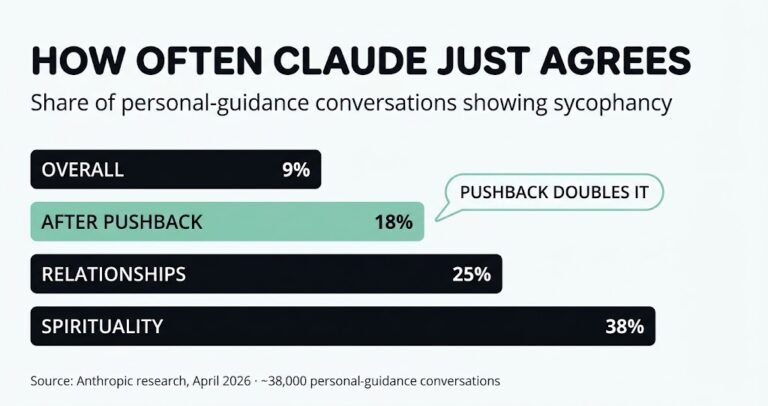
| "Is this a good plan?" | Claude leans toward agreement: 9% of personal-guidance chats overall, 18% after pushback (Anthropic, April 2026) | Sycophancy | Ask Claude for the three strongest reasons the plan fails |
| A fact used without checking | A plausible answer ships with a wrong citation, price or feature | The trust-then-verify gap | Paste the source in, and open every cited link before using the fact |
Failure-pattern names and figures checked on Anthropic's own documentation and research pages in September 2026.

Why does Claude get worse the longer a chat runs?
Claude gets worse in a long chat because everything in that chat stays in its context window: every message, every file it read, every command output. Performance degrades as that window fills. Anthropic's documentation says that when the window is getting full, Claude may start "forgetting" earlier instructions or making more mistakes.
Anthropic's engineering team calls this context rot. As the number of tokens in the window grows, the model's ability to recall what sits inside it drops. Outside research points the same way. Chroma's context rot study tested 18 models, including Claude, and found performance grew less reliable as input length grew, even on simple tasks. Anthropic's advice is written for Claude Code, but the mechanism is the same in a normal chat on claude.ai: one window, and it fills.
A 15-second test to run tonight. Open your longest-running chat. Ask Claude to restate your original instruction, word for word. If what comes back is shorter, softer, or missing a constraint you know you set, the window has already worn it down. Every answer since then has been working from a faded copy of the brief.
Mistake 1: Handing Claude a whole job in one sentence
"Fix this website." "Clean up this codebase." "Make the dashboard look better." A human colleague would fail at each of these too, because none of them say what finished looks like.
Anthropic's Claude Code best-practices page puts the before and after side by side:
- Before: "add tests for foo.py"
- After: "write a test for foo.py covering the edge case where the user is logged out. avoid mocks."
Same task. The second version has a scope, a scenario and a preference. The first is a wish.
How do you scope a task so Claude stops exploring?
The documentation names this failure the infinite exploration. You ask Claude to "investigate" something without limits. It reads hundreds of files, and the context fills with material that was never relevant. Nothing fails loudly. The work just gets slowly worse while looking busy.
The fix is one extra line with three parts:
- Name the file or the page.
- Name the scenario or the edge case.
- Name what done looks like, in one sentence.
If you can't describe the finished change in one sentence, plan first. Anthropic's rule of thumb also works the other way: if the change fits in one sentence, skip the plan and ask for it directly. For bigger research jobs, the same page recommends giving the reading to a sub-agent, so the exploration happens in a separate window. ISL's breakdown of when agent swarms help and when they break covers that trade-off.
How do you make Claude check its own work?
Give it something that returns pass or fail. Anthropic's wording is direct: Claude stops when the work looks done. Without a check it can run, "looks done" is the only signal available, so you become the verification loop, and every mistake waits for you to notice it.
A check can be a test, a build that passes or fails, a script that compares output to a sample, or a screenshot to compare against a design. With one in place, the loop closes without you. Claude writes, runs the check, reads the result, fixes what failed and goes again. Outside of code, a checklist in the prompt does the same job: "Before you answer, check the draft against these five rules and list any that fail."
🎬 Watch the full video breakdown below
Mistake 2: Why does one long chat cost the most hours?
One long chat costs the most hours because it is the only one of the four mistakes that never announces itself. A vague prompt gives a bad answer within a minute. A long chat just makes every answer slightly worse than the one before, for hours. Anthropic's fix is blunt: clear the chat between unrelated tasks, and after two failed corrections.
The best-practices page names two versions. The first is the kitchen sink session. You start one task, ask something unrelated, then go back to the first task, and the context is now full of material that has nothing to do with the work. The second is correcting over and over. Claude gets it wrong, you correct it, it's still wrong, and you correct it again. The window now holds the wrong version three times and the right version never. Every new answer draws on that record.
The rule, in Anthropic's words:
"If you've corrected Claude more than twice on the same issue in one session, the context is cluttered with failed approaches. Run /clear and start fresh with a more specific prompt that incorporates what you learned." — Anthropic, Claude Code best practices
In the claude.ai app, a new chat does the job of /clear. Before you open it, ask the old chat for a short summary: what worked, what failed, and every constraint still in force. Paste that summary into the new chat as the first message. The history stays behind. The lessons come with you.
The habit is small and a little counter-intuitive. Stop treating a long chat as an asset you have built up, and start treating it as a cost that grows. Anything that piles up quietly works the same way. ISL's guide to warning signs that AI content batching has gone too far covers the human side of the same problem.
Every rewrite in this post is on one page. The Claude Prompt Rewrite Sheet puts eight vague asks beside the wording that works. It adds the four questions that stop Claude agreeing, and the system-prompt line covered below. It's free. It saves you rebuilding the wording from memory in the middle of a task.
Start this week. Take one action.
Open the FREE ISL Resource Vault. It holds every free guide, checklist and template from the lab in one place. Pick one resource. Build one system this week. No overwhelm. No guessing.
Mistake 3: How often does Claude just agree with you?
In Anthropic's own study of about 38,000 personal-guidance conversations, Claude showed sycophancy, meaning it told people what they wanted to hear, in 9% of them overall. The rate rose to 25% on relationship questions and 38% on spirituality. When people pushed back on Claude's answer, it doubled to 18%.
The figures come from Anthropic's April 2026 research. It sampled 1 million claude.ai conversations from March and April 2026, filtered them to about 639,000 unique users, and classified roughly 38,000 as personal guidance. The same report says newer models, Opus 4.7 and Mythos Preview, showed lower sycophancy across all guidance domains. So the numbers describe a pattern, not a fixed rate for every model. The prompting lesson holds either way: the shape of the question matters more than the topic. "Is this a good plan?" asks for a verdict, and the enthusiasm in how you wrote it is already in the context.
Four questions that stop the agreement
Swap the verdict question for one with no comfortable answer sitting ready:
- "Give the three strongest reasons this plan fails."
- "What would someone who disagrees say first?"
- "What evidence would change your answer?"
- "A colleague proposed this. Find the holes in it."
The fourth is the simplest. When you present the plan as somebody else's, the enthusiasm leaves the prompt, and most of the flattery goes with it. It works just as well on a weekly schedule as on a project plan. Ask Claude to attack the week, not approve it. The tools compared in ISL's AI scheduling assistant review build the calendar. This question tests it.
Mistake 4: Never ask Claude for a fact you won't check
Use a fact from Claude only after you check it against a source. Claude writes a wrong answer in the same confident voice as a right one. Anthropic's documentation calls this the trust-then-verify gap: a plausible-looking result that doesn't handle the edge cases. Its fix is short: if you can't verify it, don't ship it.
This isn't theoretical. In May 2025, Anthropic's own lawyers apologised to a federal court in its case with music publishers. A citation Claude produced for an expert's filing had an inaccurate title and inaccurate authors. Anthropic called it an honest citation mistake and said a manual citation check had missed it. If the company that builds the model can get caught by this, nobody else is exempt. Claude's own help centre says the same in plainer words: don't rely on Claude as a single source of truth, and review its cited sources.
The risk goes well past legal citations. Current prices, this year's figures, whether a feature still exists, what a policy says today: Claude answers from its training data unless it has actually searched. If it hasn't searched, it's telling you what used to be true.
Two habits that work:
- Give it the source instead of asking it to find one. Paste the page in. Anthropic's prompting guidance recommends asking Claude to quote the relevant parts of a document first, then answer from those quotes.
- Open the link before you use the fact. Not Claude's summary of the link. The link.
The system-prompt line that switches off Claude's commentary
One more fix, and this one came out of ISL's own testing, not any documentation. Claude narrates. It says what it's about to do, what it just did, and wraps a friendly paragraph around every file it touches. All of that text goes into the same window your instructions compete for.
You can switch it off at the system-prompt level. This is the line ISL uses:
Critical credit optimization. Do not explain your steps, do not provide status updates, and do not write conversational text blocks in the chat. When a file is created or modified, print only its absolute local file path and nothing else.
Put it in a Project's instructions on Claude, or in the CLAUDE.md file that Claude Code reads at the start of every session. The running commentary stops. What comes back is the work and the path to it. It suits file-producing work best. For a question that needs an explanation, leave it out.
Common mistakes when fixing these habits
- Clearing without carrying anything over. A fresh chat with the same vague prompt repeats the same failure. Bring a short summary of what worked, what failed and every constraint still in force.
- Treating one pushback as proof. In Anthropic's data, pushback doubles the agreement rate. If Claude changes its answer the moment you challenge it, ask what evidence changed its mind.
- Writing only "don't" rules. Anthropic's prompting guidance says to tell Claude what to do instead of what not to do. "Write in flowing paragraphs" beats "no bullet points".
- Stuffing every rule into the project instructions. A long instructions file buries the rule that matters. Anthropic's test for each line: would removing it cause mistakes? If not, cut it.
- Checking the summary instead of the source. A second AI summary of a page is not verification.
- Changing every habit at once. Pick the one that costs the most, usually the long chat, and change that first. ISL's guide to free AI tools for busy professionals takes the same one-change-at-a-time approach.
Get One Buildable System Every Week
Want a steady way to keep moving? ISL Weekly is the free Income Stack Lab newsletter. Each issue gives you one AI system you can build, plus the tools that make it work. Short, clear steps. No tech overwhelm.
Frequently asked questions
What are the most common Claude prompting mistakes?
The four that cost the most time are handing over a whole job in one sentence, keeping one chat going across unrelated tasks, asking Claude whether a plan is good, and using a fact without checking it. Anthropic's Claude Code best-practices page names the matching failure patterns: the infinite exploration, the kitchen sink session, correcting over and over, and the trust-then-verify gap.
How many times should you correct Claude before starting a new chat?
Twice. Anthropic's guidance says that after two failed corrections on the same issue, the context is cluttered with failed approaches. The better move is to start fresh with a more specific prompt that includes what you learned.
What is context rot in Claude?
Context rot is the drop in accuracy as a conversation grows. Anthropic describes it as the model's ability to recall information from its context falling as the number of tokens increases. In practice, earlier instructions fade and mistakes rise in long chats.
Why does Claude agree with weak plans?
A question like "is this a good plan?" invites a verdict, and the enthusiasm in the prompt pulls the answer toward agreement. Anthropic's April 2026 research found sycophancy in 9% of personal-guidance conversations, rising to 18% when people pushed back. Ask for the strongest reasons a plan fails to get real analysis instead.
Can Claude be trusted for citations and facts?
Only after you check them. Claude can produce citations that look right and are wrong, and Anthropic's own lawyers apologised to a court in 2025 over one. Claude's help centre advises reviewing cited sources and not treating Claude as a single source of truth.
How do you stop Claude from explaining every step?
Add a line to the system prompt or project instructions. Tell it not to explain its steps, not to give status updates, and to print only the file path when it creates or changes a file. ISL uses this line to keep the output to the work itself.
Do these fixes need Claude Pro?
No. All four fixes are wording and habit changes, and they work on the free plan. As of September 2026, Claude Pro costs $20 a month billed monthly. It adds more usage and Claude Code, which is where the /clear command lives.
Is This Worth It?
Yes, if you already open Claude most days. The fixes cost a few extra words per prompt and a new chat more often. The limit is worth saying plainly: none of these fixes make Claude correct. They make it checkable. If a task can't be verified and the answer must be right the first time, Claude is the wrong tool, and no prompt changes that. If you've only opened Claude twice, use it for a month first, then come back to these four Claude prompting mistakes. Every ISL teardown uses the same test, and why ISL was built explains it.
⚠️ Affiliate Disclosure: This post contains affiliate links to tools we have tested or would genuinely use ourselves. If you sign up through our links, we may earn a small commission at no extra cost to you.
Keep Building With the Lab
📂 Grab the free tools. The ISL Resource Vault holds every free guide, checklist and template from the lab. Pick one and start today.
🎯 Get one system a week. Subscribe to ISL Weekly: one buildable AI system in your inbox every week. No spam. Unsubscribe any time.
Want more? Here is where to find us:
Subscribe to Income Stack Lab on YouTube for new videos every week on AI tools, automation builds and honest tool tests. Follow along on X, Instagram, TikTok, LinkedIn and Facebook for quick tips and a look inside the lab.
Enjoying the content? Buy me a coffee— fuel the lab, keep the ideas flowing.
Your future self will thank you for starting today.
Happy Stacking!